Honest comparison
A Google Maps alternative for the part after the pins
Everybody plans their trip in a shared Google Maps list, and everybody arrives with forty pins, no days and a pin called "here?" left by someone who cannot remember why.
Google Maps is not going anywhere
Nothing on earth beats Google Maps for navigation, transit and knowing whether a place is open right now. We use its data ourselves. This page is not an argument to stop using it, because you will not, and neither will we.
- Turn by turn navigation and transit directions. Not close.
- The place database and the reviews, which we read from the same source.
- Everyone already has it and knows how it works.
- Street View, which is genuinely useful for checking whether a hotel street looks like the photos.
Side by side
| What | Google Maps lists | TripSake |
|---|---|---|
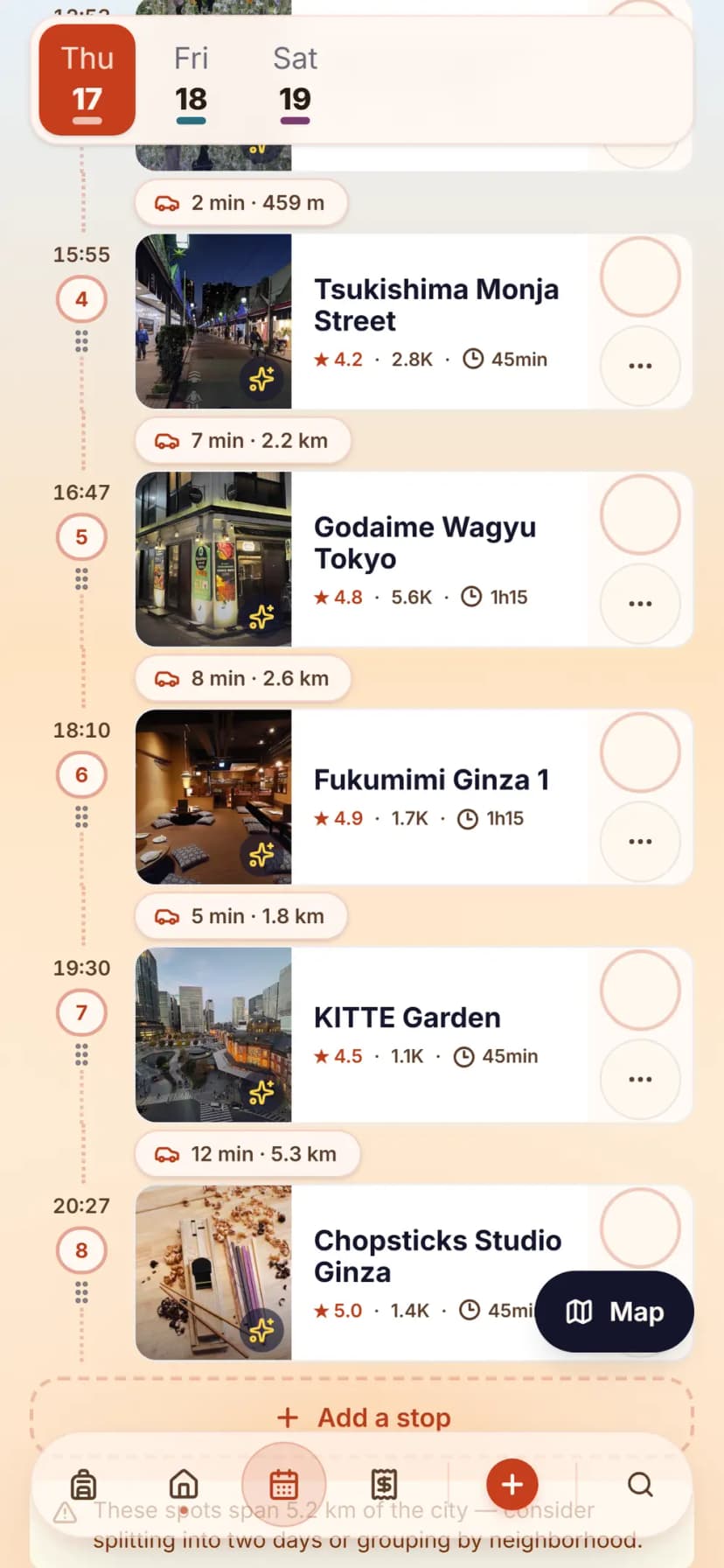
| Turning pins into days | A list has no days. You reorder pins by hand and the list has no idea when anything opens. | The pins become a schedule: clustered by area, ordered by opening hours, with real travel time between them. |
Turning pins into days Google Maps lists A list has no days. You reorder pins by hand and the list has no idea when anything opens. TripSake The pins become a schedule: clustered by area, ordered by opening hours, with real travel time between them. | ||
| Navigation | The best there is. | We hand you off to Maps for the actual walking directions, because rebuilding that would be silly. |
Navigation Google Maps lists The best there is. TripSake We hand you off to Maps for the actual walking directions, because rebuilding that would be silly. | ||
| Why a pin is there | A star on a map with no note, saved four months ago. | The reel or the link that made you save it stays attached to the spot. |
Why a pin is there Google Maps lists A star on a map with no note, saved four months ago. TripSake The reel or the link that made you save it stays attached to the spot. | ||
| Group agreement | Shared lists are editable by everyone, which means the loudest person wins and nobody knows what is decided. | Vote per spot, poll for the big ones, and the plan shows what the group actually chose. |
Group agreement Google Maps lists Shared lists are editable by everyone, which means the loudest person wins and nobody knows what is decided. TripSake Vote per spot, poll for the big ones, and the plan shows what the group actually chose. | ||
| Duplicates | Three people save the same bar three times. | The same place saved by different people merges into one spot with all three names on it. |
Duplicates Google Maps lists Three people save the same bar three times. TripSake The same place saved by different people merges into one spot with all three names on it. | ||
| Bookings | Live in your inbox, not on the map. | The hotel and the timed tickets anchor the day, and the plan is built around them. |
Bookings Google Maps lists Live in your inbox, not on the map. TripSake The hotel and the timed tickets anchor the day, and the plan is built around them. | ||
| Money | Not its job. | Shared expenses and balances on the same member list as the trip. |
Money Google Maps lists Not its job. TripSake Shared expenses and balances on the same member list as the trip. | ||
| Offline | Offline areas work well if you remembered to download them. | The plan and the spots are offline by default. |
Offline Google Maps lists Offline areas work well if you remembered to download them. TripSake The plan and the spots are offline by default. |
What each one costs
Google Maps
Free
Maps costs nothing and never will, which is exactly why the honest comparison here is about shape rather than price. It is a map, not a planner.
TripSake
Free
TripSake is free to use. There is no subscription, no per-trip charge and no feature behind a paywall today. Core planning features stay free.
Competitor prices and tier limits verified on . Plans change; check the vendor’s own pricing page before you decide.
From a starred list to a plan
- Create the trip with the dates and the city.
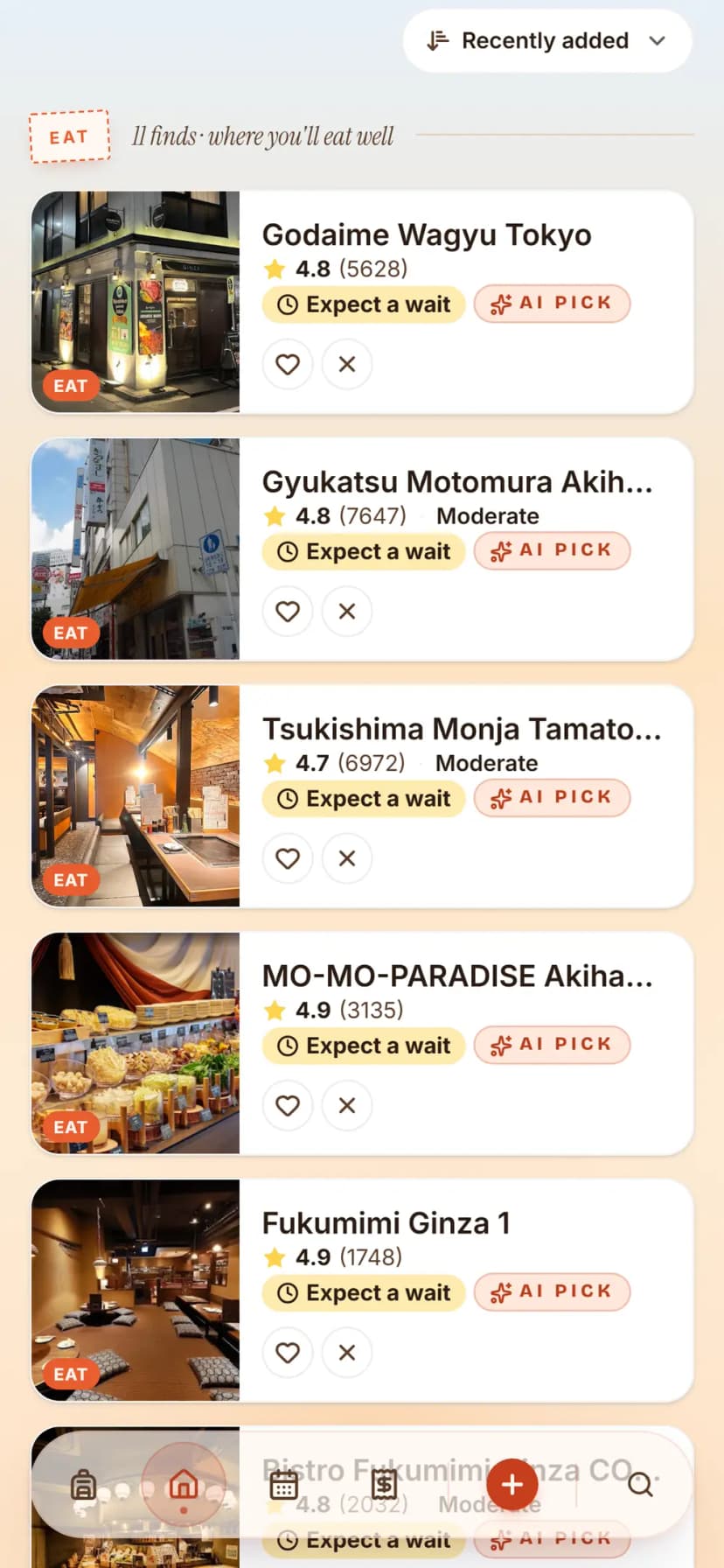
- Paste the place names from your list, or share them into the app from Maps.
- Add the reels and TikToks that were never in Maps to begin with.
- Generate the days and move the two stops you disagree with.
- Keep Maps for navigation. Tapping a stop opens it there.
A shared list is a good place to collect and a terrible place to decide. Keep collecting in Maps if that is the habit. The forty pins still have to become four days at some point, and that is the job we do.
Common questions
Before you switch
Can Google Maps plan an itinerary?
Not really. It saves and stars places and gives directions between two of them. It has no concept of a day, an opening time conflict or an order that makes geographic sense.
How do I turn a Google Maps list into a day by day plan?
Paste the place names into a TripSake trip and generate the days. The stops are grouped by area and ordered around opening hours and any timed bookings you have.
Does TripSake replace Google Maps?
No. Use Maps for navigation. TripSake decides what you are doing and when, then hands the walking directions back to Maps.
Can my friends add places without an account?
Yes. The invite link puts them in the trip as guests, where they can add spots, vote and see the plan.
What happens if two of us save the same restaurant?
It becomes one spot, with both of you shown as having saved it. Duplicate pins are the most common mess in a shared Maps list.
Other comparisons
- A Splitwise alternative with no expense cap — and the rest of the trip in it
- A Wanderlog alternative where offline and dark mode are not the paid tier
- A TripIt alternative for trips with other people in them
- A Roadtrippers alternative for trips that are not only driving
- A Polarsteps alternative that plans the trip, not only remembers it
- A Notion travel planner alternative for people tired of maintaining a database